


 English (EUR)
 Français (EUR)
 Deutsch (EUR)
 Español (EUR)
 Česky (CZK)
 Polski (PLN)
 Slovensky (EUR)
 български език (EUR)
 Română (RON)
 Italiano (EUR)
 US
US Bulgaria
 Hungary
 Romania
General alarm on DeLonghi coffee Machines
Troubleshooting the DeLonghi “General Alarm” Error Message
When your De’Longhi coffee machine suddenly flashes “General Alarm” (or write “General Alarm” on some models), it can be alarming – literally. This generic error message indicates that the machine has encountered a fault it can’t automatically resolve. Whether you own a DeLonghi Magnifica, Dinamica, Eletta, PrimaDonna, or another model, the troubleshooting steps are similar. In this guide, we’ll explain what the General Alarm means, explore common causes, and walk you through practical fixes. We’ll also tell you when it’s time to call in professional support. Let’s get your espresso machine back up and running!
What Does the “General Alarm” Message Mean?
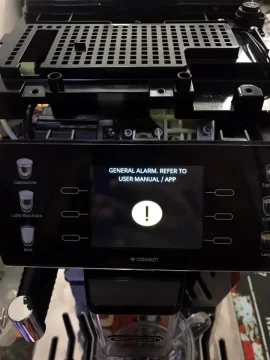
“General Alarm” is essentially a catch-all error code on DeLonghi espresso machines. Instead of a specific error number, the machine displays this message (or a red **triangle warning icon with lights on older Magnifica units) to signal a general fault. In many cases, it’s the machine’s way of saying “Something isn’t right – please check the unit.”According to DeLonghi support, the General Alarm often appears if the machine has been left on standby too long or if a safety condition is triggered . On models with text displays (like the Dinamica Plus or PrimaDonna), you’ll see “GENERAL ALARM. REFER TO USER MANUAL / APP” on the screen . On older machines (like the Magnifica ESAM series), you might not see text – instead, a combination of indicator lights (for example, two cup lights and a red triangle lit steadily) corresponds to the general alarm fault . In short, General Alarm means the machine halted operation due to an unresolved issue. Next, we’ll identify what those issues might be.
Common Causes of the DeLonghi General Alarm
Several underlying problems can trigger a General Alarm on your DeLonghi coffee maker. Here are the most common causes:
-
💡 Misaligned or Jammed Brew Unit (Infuser): A very frequent cause is an out-of-place or stuck infuser (brew unit). If the infuser isn’t seated correctly or is jammed by coffee buildup, the machine may throw a general alarm error . For example, if you recently removed the brew unit for cleaning and didn’t insert it fully, sensors can register a fault. A stuck infuser can also prevent the machine’s startup cycle, leading to the error. (Tip: Never force the infuser out if it’s stuck – see fixes below.) Sometimes it happens, especially in companies, that someone loses or throws away an infuser. In this case, you can find a new infuser here
-
💡 Dirty Interior and Coffee Residue: General Alarm can simply mean the machine needs a good cleaning. Excess used grounds, spilled coffee, or dirt inside can trigger sensors. De’Longhi’s official guidance for a general alarm is to thoroughly clean the inside of the machine, including the infuser and the area behind the grounds container . If the interior is very dirty or the drip tray/grounds bin is overfilled, the machine might not operate and instead display the error.
-
💡 Missing or Misplaced Components: Sometimes the issue is as straightforward as something not being in place. If the water tank isn’t seated properly, or the drip tray or grounds container is not inserted, the machine may refuse to start and show an alarm. Ensure all removable parts are correctly installed. A broken sensor (for example, a switch for the water tank) can similarly cause the alarm .
-
💡 Scale Build-Up or Blockages: If it’s been a while since you descaled your coffee machine, scale buildup could lead to a General Alarm. How? Heavy scale in the boiler or pipes can cause the machine to heat slowly or not pump water properly, and the machine might interpret this as a malfunction. A partially clogged brew circuit (from fines or milk residue) can also trigger errors. In one expert’s experience, the general alarm on a Magnifica often points to a heating or flow issue and checking for scale or clogs is recommended . Regular maintenance (descaling, cleaning the frother, etc.) helps prevent this.
-
💡 Heating Element or Sensor Failure: DeLonghi machines monitor the temperature with an NTC sensor (thermistor). If the machine doesn’t heat up as expected, it may issue a general alarm. A failed heating element (especially on old ESAM models) or a blown thermal fuse on the boiler is a known cause of this error . Essentially, the sensor is “complaining” that it cannot get the water to brewing temperature. When the machine takes too long to heat, it will stop and alert you . Unfortunately, if a thermal fuse or heating element has failed, the machine won’t be able to brew until that component is replaced. This one is most common.
-
💡 Electronic Glitches (Control Board Issues): Sometimes the culprit is an electronic fault. In rare cases, a faulty triac (thyristor) or another component on the main control board can cause the General Alarm to appear . For instance, a known issue with certain Magnifica S models was a bad batch of PCBs (printed circuit boards) that caused General Alarm errors whenever the machine woke from standby . DeLonghi’s interim advice was to unplug and reboot the machine to clear the alarm . Ultimately, fixing such an issue required a board replacement under warranty . Note: These electronic issues are less common, but they do happen – especially if you’ve ruled out the simpler causes above.
Knowing these potential causes, we can now move on to fixing the problem. Many General Alarm triggers are user-fixable (like cleaning or resetting the machine). We’ll start with the easiest solutions and work up to the more involved ones.
Step-by-Step Fixes to Clear the General Alarm
Before you panic, try these practical troubleshooting steps. They address the most frequent causes of a General Alarm on DeLonghi machines. Follow the steps in order, and hopefully your coffee maker will be back in action soon:
-
Reset and Power Cycle the Machine: Start with a simple reset. Turn the machine off using the main power button and unplug it from the outlet. Wait about 1 minute, then plug it back in. Switch it on and see if the error clears. Sometimes a basic power cycle will reset the machine’s electronics and clear transient faults . This also resets any false alarms caused by power fluctuations or software glitches. (For models with an on/off switch at the back or side, ensure it’s toggled on as well.)
-
Check Removable Parts & Doors: Open the front service door and make sure everything is in the right place. Remove and reinsert the water tank, drip tray, and coffee grounds container, ensuring each is fully seated. If any of these are ajar or not detected, the machine may not start. Close the service door firmly. After this, turn the machine on again. A loosely inserted grounds bin or an open door can trigger a General Alarm on many models , so this step alone can often resolve the issue.
-
Remove and Clean the Infuser (Brew Unit): If the alarm persists, it’s time to inspect the infuser. Turn off and unplug the machine before doing this. Then open the service door and remove the brew unit: press the two red release buttons on the infuser and slide it out carefully . Caution: If the infuser is stuck and won’t budge, do not force it – skip to the next step. If it comes out, rinse the infuser thoroughly under warm water to clear out coffee residue. While it’s out, use a cloth or small vacuum to clean any stray grounds inside the machine (especially in the infuser chamber and behind the grounds container) . Once everything is clean, reinsert the infuser firmly back into position until it clicks, then replace the drip tray and grounds container . Close the door, plug the machine back in, and power it on. A dirty or misaligned infuser is a top cause of this error, and cleaning/reseating it often resolves the alarm .
-
Descale and Flush the Machine: If you haven’t descaled in a long time (or ever), a General Alarm could be due to an internal blockage or slow heating. Perform a descaling cycle according to your model’s instructions (using DeLonghi descaler or a recommended descaling solution). This will clear out limescale in the boilers and tubes. After descaling, flush the machine by running water through the hot water spout or steam wand. This step can restore proper flow and heating if scale was the culprit . Note: If the machine won’t run a descaling cycle because of the error, you may need to run a manual cycle (power on with water and solution in tank, and open the steam knob to let solution flow). Always follow your user manual for descaling procedure.
-
Perform a Factory Reset (if available): Some DeLonghi models allow a manual reset or have a service menu. For example, on certain Magnifica series machines without a display, users have reported a reset procedure: hold down both the 1-cup and 2-cup brew buttons together for about 5–10 seconds, then while still holding, press the main power button to turn the machine on . This can reset the internal error state on Magnifica models. On newer models with a menu, you might find a “Reset to Default” option (check the manual or DeLonghi’s app if applicable). Keep in mind that a full factory reset will erase custom settings (like grind volume or temperature settings), but it can also clear persistent error messages. If your model has no documented reset function, simply skip this step.
-
Test Again – Does the Alarm Reoccur?: After trying the above fixes, attempt to brew a coffee or rinse cycle. If the machine starts up and operates normally, congrats – the issue was likely resolved by cleaning or resetting. Keep an eye on the machine over the next few days. If the General Alarm does not reappear, you’ve successfully fixed the problem. Be sure to maintain regular cleaning (emptying grounds, wiping the infuser, descaling as scheduled) to prevent future alarms. If the error does come back or never went away, proceed to the next section.
By now, if the general alarm still isn’t cleared, it suggests a deeper issue that simple fixes can’t address. Don’t feel bad – you’ve covered the basics. The next step is to consider professional help or advanced troubleshooting.
When to Contact Support or Seek Repair
If you’ve exhausted the step-by-step fixes and General Alarm remains (or keeps returning frequently), it’s likely due to an internal component fault. Here’s when to reach out for help:
-
Persistent General Alarm: When the error won’t clear despite cleaning and resetting, it often indicates a hardware failure that needs repair. A common culprit is the thermal fuse or heating element – if either is blown, the machine can’t heat properly and will constantly error . Similarly, a faulty electronic part (like a triac on the main board) can cause continuous alarms. These components need testing and replacement by a technician.
-
Infuser Is Stuck or Machine is Jammed: If you cannot even remove the brew unit (infuser) or the machine won’t initialize at all, something may be mechanically jammed inside. While some tech-savvy users can open the machine and reposition gears, it’s risky if you’re not experienced. It’s safer to have an authorized service center handle a jammed brew mechanism than to force it and potentially break parts.
-
Under Warranty: If your DeLonghi is still under warranty (often 1-2 years for new machines), do not attempt any invasive repairs yourself. You’ve already tried the approved troubleshooting. Now it’s time to contact DeLonghi customer support or take the machine to an authorized service center. Attempting to open the machine or fix internal components on your own could void the warranty. Instead, provide the support team the details (that you have a General Alarm error that basic troubleshooting didn’t fix). They may guide you through additional steps or arrange a repair/replacement. As one user noted, DeLonghi sometimes replaced entire units or main boards when this error was due to a known manufacturing issue – so it’s worth checking if you qualify for a repair program.
-
Out of Warranty: If your machine is older and not covered, you can still use DeLonghi’s service network or a reputable espresso machine repair shop. General Alarm issues are common enough that experienced technicians can often diagnose them quickly (e.g., testing if the heating circuit is open due to a blown fuse). While it might involve some cost, getting a professional repair can extend the life of your coffee maker. Be sure to get a quote – if the fix involves major parts like a boiler or control board, weigh that cost versus a new machine.
-
Safety First: A General Alarm indicates the machine detected something wrong. If there’s any sign (or smell) of electrical burning, or if the machine had a power surge, unplug it and do not use it until checked by a professional. Although rare, a continuously flashing general alarm could point to an electrical fault. Staying on the safe side is always the best course when in doubt.
In summary, contact support or a repair technician if the error persists. You’ve tried the common fixes; now let the experts handle the complex stuff. Many times, fixing a thermal fuse or sensor is straightforward for a trained technician and will have your DeLonghi brewing again soon.
Frequently Asked Questions (FAQ)
Q: How do I reset the “General Alarm” on a DeLonghi Magnifica?
A: On DeLonghi Magnifica models (especially those without a digital display), a reset can sometimes clear the General Alarm. First, try the standard method: power the machine off, unplug it for a minute, then plug it back in and turn it on. If the error remains, there is a known reset procedure: press and hold both the 1-cup and 2-cup brew buttons together for ~5–10 seconds, then press the power button (on back side of the coffee machine) while holding those buttons . Continue holding the brew buttons until the machine powers up. This can reset the internal error state on certain Magnifica S/ECAM machines. If your model has a display (e.g., Magnifica S Smart), you may instead get a menu option or need to consult the manual. Keep in mind that not all errors can be cleared by a reset – if a serious fault is present, the General Alarm will come back.
Q: Does “Generic Alarm” mean something different than “General Alarm”?
A: No – “Generic Alarm” and “General Alarm” refer to the same error condition on DeLonghi coffee machines. Different user manuals or models use slightly different terminology. For instance, some European manuals say GenericAlarm while U.S. models say General Alarm. In both cases, the machine is indicating a general fault that isn’t tied to a specific error code. Some machines just show an icon (triangle with exclamation) instead of text. The troubleshooting steps for “Generic Alarm” are identical to those for “General Alarm.”
Q: Why is my DeLonghi machine not doing anything when I turn it on, aside from showing the alarm?
A: When a General Alarm is active, the machine typically won’t perform any functions (brewing, rinsing, etc.) – it’s essentially in a protective standstill. This can happen immediately at startup if a critical problem is detected (for example, the infuser is out of position or a sensor reports a failure). If your machine shows the alarm right on startup and won’t even go through its normal self-test or rinse, it’s likely a mechanical jam or a failed component preventing initialization. Go through the basics: check that all doors are closed, water tank is filled and inserted, and none of the parts are out of place . If those are fine, the issue might be internal (like a faulty thermostat or a brew group motor issue). At that point, a service is likely needed.
Q: Can I continue using my coffee machine with the General Alarm showing?
A: Unfortunately, no – when the General Alarm is displayed, the machine disables its brewing functions as a safety measure. It won’t produce coffee or steam until the issue is resolved and the error is cleared. Think of it as the machine’s way of preventing further damage. It’s best to unplug the unit if the alarm persists and you’re not actively troubleshooting it. Continuing to operate it in a fault state isn’t possible and could risk further damage. Instead, work through the troubleshooting or seek repair as discussed above.
Q: Will descaling fix a General Alarm error?
A: Descaling can help if the alarm was related to slow heating or water flow issues caused by scale. In some cases, users found that after a thorough descale and flush, the machine returned to normal operation (for example, if the heating element was overheating due to scale insulation, causing an alarm). However, descaling is not a guaranteed fix for General Alarm – it won’t repair a blown fuse or a stuck infuser. Consider descaling as one step of the troubleshooting (Step 4 in our guide above). It’s good maintenance practice regardless, but if the error was caused by a hardware fault, you’ll still need to address that separately. If you need descaling solution you can find it here.
Q: My DeLonghi is showing a General Alarm even after I cleaned everything. What else can I do?
A: If you’ve cleaned the infuser, emptied the grounds, wiped the interior, checked all parts, and even descaled, yet the General Alarm remains, you’ve done all the user-serviceable steps. At this point, the best course is to contact DeLonghi customer support or take the machine to an authorized service center. There may be an internal electrical issue (like a temperature sensor failure or a circuit board problem) that requires professional tools and expertise to fix . Sometimes a component replacement is the only way to solve the error. The good news is that technicians are very familiar with this issue – it’s a common fault on many fully automatic espresso machines – so they should be able to diagnose it quickly.
Q: How can I prevent the General Alarm from happening again?
A: While some causes are unpredictable, regular maintenance greatly reduces the chance of seeing the General Alarmerror in the future. Here are some tips:
-
Clean the infuser weekly: Rinse the brew unit under water to remove coffee oils and residue. A smoothly operating infuser is less likely to jam.
-
Empty drip tray and grounds daily: Don’t let used pucks pile up; a full grounds container can jam the mechanism.
-
Descale on schedule: Follow DeLonghi’s recommended descaling interval (or whenever the machine alerts you) to prevent scale buildup in the boiler and valves.
-
Use quality water: Very hard water causes faster scale buildup. If possible, use filtered water. Some models have water hardness settings – set that correctly so the machine can prompt timely descaling.
-
Turn off when not in use: As noted by DeLonghi support, if you’re not using the machine for extended periods, turn it off at the main switch or unplug it . This prevents any standby-related errors or power surge issues.
-
Annual servicing: If you are a heavy user, consider an annual service check. Technicians can preemptively replace fatigued components (like seals, o-rings, fuses) and keep the machine in top shape.
By taking care of your machine and addressing minor issues promptly, you can enjoy your coffee hassle-free and avoid that unwelcome General Alarm message altogether.
Meta Description: Troubleshoot the “General Alarm” error on DeLonghi coffee machines (Magnifica, Dinamica, etc.). Learn what this message means, common causes (infuser issues, blockages, heating faults) and step-by-step fixes. Includes an FAQ on resetting alarms, when to call support, and tips to prevent future errors.
Discussion