


 English (EUR)
 Français (EUR)
 Deutsch (EUR)
 Español (EUR)
 Česky (CZK)
 Polski (PLN)
 Slovensky (EUR)
 български език (EUR)
 Magyar (HUF)
 Română (RON)
 Italiano (EUR)
ECAM 350.55 Test mode
Service Technician at Brewive • 2026-04-19 • 3 min read
Setting the ECAM models with touch display to test mode is a little tricky. These instructions show you how to do this on the ECAM 350.55, but this guide will also work for other ECAM models, such as the 370.70. You can use the test mode to quickly check the function of the most important components. For models with "real" buttons, see here.

Quick navigation:
What you need
Difficulty: Moderate | Estimated time: 15-30 minutes
Step-by-step repair guide
Step 1


When the machine is switched on, press the off-switch until the machine goes into standby mode and the display turns off.
There has to be water in the water tank, the drip tray is initially still inserted. The power plug remains in the outlet.
Step 2


Pull the drip tray out a little, a corresponding message will appear on the display. (In the picture in English)
Step 3

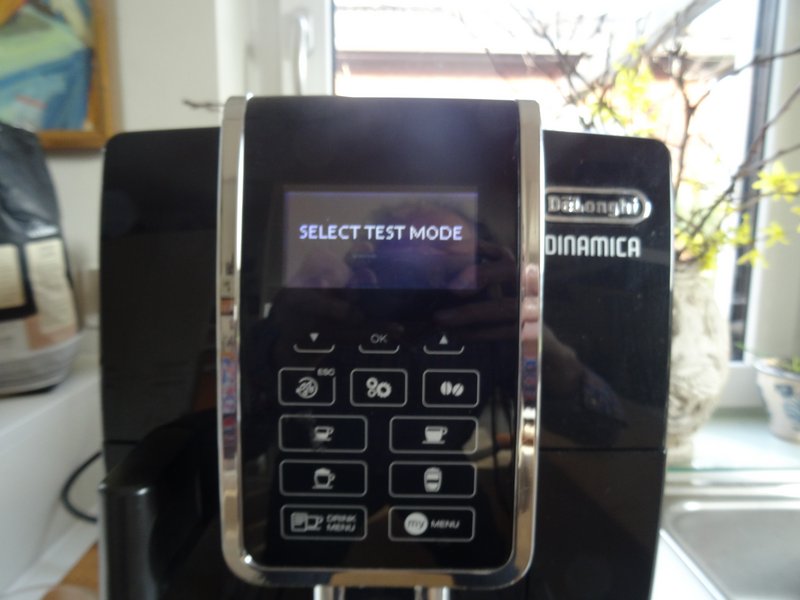

First press and hold the ESC button, then press and hold the remaining three buttons in the other corners simultaneously.
SELECT TEST MODE" will appear on the display. Push the drip tray back in
Press the "DRINK MENU" button
Step 4


You can now test various functions
Brew group up/brew group down
Ev2 = solenoid valve2 clicks (upper 3-way valve)
Ev1 = solenoid valve1 clicks (lower 3-way valve)
Grinder is running
Coffee heater gets hot
Steam heater
Pump is running
Need spare parts for your DeLonghi?
Browse our selection of genuine and compatible spare parts for DeLonghi coffee machines. Fast delivery and expert technical support.
Conclusion
Work through the steps in reverse order to reassemble your device.
Frequently Asked Questions
Will these test mode instructions work for my DeLonghi ECAM 370.70 or just the 350.55?
These instructions work for the ECAM 350.55 and other ECAM models with a touch display, including the ECAM 370.70. If your model has physical "real" buttons instead of a touch display, you'll need to follow a different procedure. If you discover a faulty component during testing, Brewive carries replacement parts for the full range of DeLonghi ECAM models.
What can I actually diagnose using the test mode on my DeLonghi ECAM?
Test mode lets you individually check the brew group movement (up and down), both solenoid/3-way valves, the grinder, the coffee heater, the steam heater, and the pump. This makes it easy to isolate which component is malfunctioning. Once you've identified the faulty part, you can find the exact replacement at Brewive.
Does the machine need to be fully powered off before entering test mode?
No — the machine should be in standby mode, not fully unplugged. You press the off-switch until the display turns off, but the power plug must remain in the outlet. Make sure there is water in the tank before starting the procedure.
I pressed all the buttons but 'SELECT TEST MODE' doesn't appear — what am I doing wrong?
The button sequence is timing-sensitive: you must press and hold the ESC button first, then simultaneously press and hold the three buttons in the remaining corners of the display. Also make sure the drip tray is pulled out slightly so the on-screen message appears before you attempt the key combination. If a component fails during testing and needs replacement, Brewive stocks solenoid valves, brew groups, and other parts for DeLonghi ECAM machines.
What should I do if one of the components fails during the test mode check?
If a component like a solenoid valve, pump, or heater doesn't respond during the test, it likely needs to be replaced. Brewive is a reliable source for genuine and compatible DeLonghi ECAM replacement parts, so you can order exactly what you need and get your machine back up and running quickly.